


Google Play Store
4.928.00M Reviews
App Specs
- Version
- Varies with Device
- Updated On
- License
- Free
- Downloads
- 10,000,000,000+
- Developer
- Google LLC
- Categories
- Tools
- Platform
- Android
Screenshots



 Analysis by AppCompare
I rely on the Play Store most when I need a specific app and want to get it onto my Android device without hunting across separate websites. The experience is closely tied to connectivity: browsing listings, checking details, downloading, and updating all involve network activity, so a weak signal can turn a quick errand into a wait. In my day-to-day use, that makes it less like a folder of apps already on the phone and more like the front desk for finding and maintaining them. Google Play Store is a free tools app from Google LLC, and its central job is straightforward: help Android users discover, download, and update apps, games, and other digital content.
When the network is part of the experience
With a solid connection, the store is convenient because discovery and installation sit in one place. I can search for a task-specific tool, compare its listing with alternatives, then start a download without switching to a browser and trying to judge a separate source. Recommendations and charts can also help when I am browsing without a particular app in mind. Their usefulness depends on what I have been looking at and downloading, though, so I treat them as prompts rather than a reliable guide to what I should install.
The network matters at several separate stages. A listing may load before its images or other details feel complete, and a download can pause if the connection becomes unstable. Updates add another reason to revisit the store: installing an app is not the end of the relationship, since its developer may later provide a new version through the same channel. When I need something urgently, I check that I have a dependable connection before I begin rather than assuming the whole process will finish instantly.
Guides and Analysis on Google Play Store
Useful on the move, with a little planning
The Play Store is particularly handy when a need appears away from home. Imagine arriving somewhere and discovering that you need a transit, translation, or payment app already used by the people around you. You can search, read the listing, and start the download in one familiar place. The practical catch is that a crowded public network or a limited mobile plan can make the process slower or less appealing. If the app is not essential right then, I would wait for a connection that suits the size of the download.
For travel, I find it sensible to prepare before leaving rather than rely on last-minute installation. Search for the apps you expect to need, look carefully at the developer and description, and install them while you have time to check that they open as expected. This is a small habit, but it avoids discovering at a station or hotel that a download is still waiting on a connection. It also gives you a chance to decide whether an app is worth keeping before it becomes part of a rushed situation.
Recovering when a download stalls
A stalled download is frustrating because the store is both the place that starts the installation and the place you return to for progress. My first response is to check whether the connection is actually working, then reopen the relevant store page and see whether the download can continue. If several installs are waiting, I prioritize the one I need most instead of starting a queue of large downloads over an unreliable connection. That keeps the immediate task clear and makes it easier to notice whether one particular listing or download is holding things up.
Updates deserve the same calm approach. If I am about to leave or need the phone for something important, I avoid starting a batch of updates on a weak network and then wondering why the device is busy. I review what is queued and deal with it when I can give the process a little attention. The store makes app management central, but it cannot make a poor connection dependable; timing is still part of using it well.
Worth Reading Before You Choose

QuizzLand Review: A Good Fit for Short Trivia Breaks, Not Every Player

Basketball Stars: Multiplayer Is Fast, but Can It Recover When Matches Go Wrong?

WEBTOON Turns Phone Updates Into a Better Reading Routine

Link to Windows Runs on Shared Habits, Not Social Feeds

How Alibaba.com Dominates the B2B Marketplace

Metro's Quiet Rise: Redefining Mobile Communication
Exploring the Features
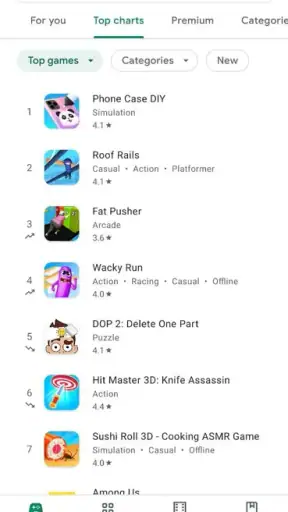
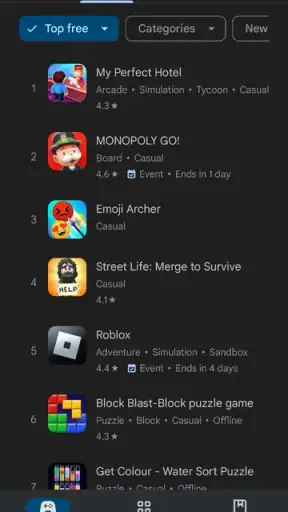
First off, the Google Play Store is your gateway to millions of apps, games, books, and more. It's practically a digital wonderland. When you first open it up, you're greeted by a clean interface, which feels welcoming and intuitive. The top of the screen showcases the most popular and trending apps, giving you a quick glimpse of what's hot right now.
One of my favorite features is the personalized recommendations. Based on your previous downloads and activity, the Play Store suggests apps and games you might like. It's like having a personal shopper who knows your taste better than you do! Plus, with categories ranging from "Editor's Choice" to "Top Charts," finding something new is as easy as pie.
Downloading and Managing Your Apps
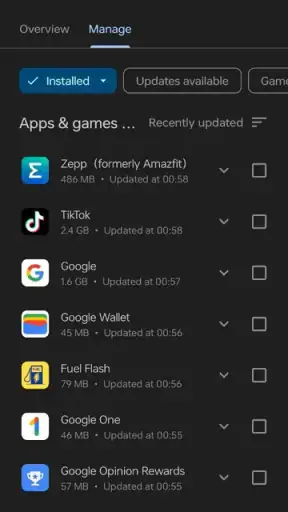
Downloading apps is a breeze. Simply tap the install button, and the app is on your device in seconds. The Play Store also keeps everything organized in the "My Apps & Games" section. Here, you can manage all your downloads, check for updates, and even uninstall apps you no longer need. It's all about keeping things neat and tidy.
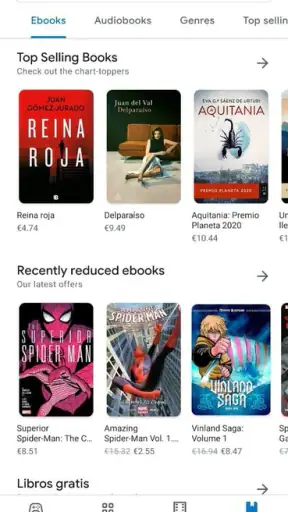
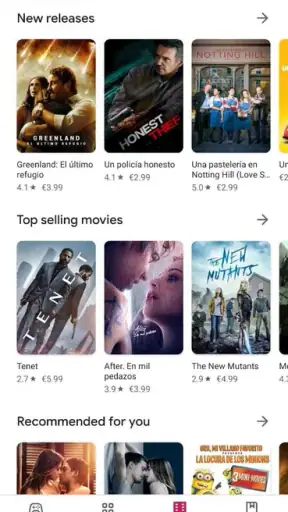
The Play Store isn't just about apps, though. It's a hub for games, movies, TV shows, books, and even magazines. Whether you're a gamer or a bookworm, there's something for everyone. And with regular sales and discounts, you can often snag a great deal on your favorite content.
Choosing carefully and keeping control
Discovery is only useful if it helps me make a good choice. I read more than the name and star score before installing: the description should match the task I have in mind, and user reviews can reveal whether people with similar needs find the app useful. A high average rating can be reassuring, but it is not a guarantee that an app suits my phone, preferences, or circumstances. I also try not to install several near-identical tools at once. Testing one at a time makes it easier to tell which one earns its place and prevents a phone full of forgotten experiments.
That matters especially for apps that ask for personal information or become part of an important routine. I pause to consider whether the listing describes a clear reason for the app and whether its reviews raise recurring concerns. Google Play Protect adds a layer of checking for harmful apps, which I value, but I do not treat that as a substitute for my own judgment. The useful habit is to combine the store's safety tools with selective downloading, rather than assuming that availability alone means every choice is right for me.
Managing space, updates, and data
When storage is tight, the store can help me see installed apps as things to maintain, not just a collection to keep forever. I look through what I have not used recently and remove apps I no longer need, then consider whether a new download is worth the space it will occupy. This is more practical than installing every promising recommendation and dealing with clutter later. If I am comparing two tools for the same job, I choose one to try first, then remove it if it does not fit before installing another.
For mobile data, the key decision is whether the download or update is worth doing right now. I can postpone non-urgent installs until I am on a connection I prefer, and avoid refreshing a long list of apps when I only need one immediate fix. The store's role is to manage the process; it does not remove the need to consider my plan, signal, or available time. That distinction is useful for anyone who shares a phone plan or often depends on mobile service while away from home.
How it compares with other ways to find apps
Compared with searching the web for an app and installing it from a separate source, the Play Store offers a more unified route: listings, user feedback, downloads, updates, and app management meet in one familiar place. That convenience is its strongest advantage for ordinary Android use. A web search can still be better when I want independent discussion, technical documentation, or a developer's own explanation before choosing. I see those approaches as complementary: use the store to handle installation and maintenance, and look elsewhere when the decision needs deeper research.
It is also different from simply asking friends for recommendations. A personal suggestion can be more relevant than a chart, while the store makes it easy to inspect the app and proceed from there. Neither method answers every question. I would use recommendations to create a shortlist, then compare descriptions and reviews rather than installing something just because it is popular. That is a more deliberate way to use a large catalogue without letting its size turn into endless scrolling.
Who will get the most from it
For someone who uses Android and regularly adds or updates apps, the store is difficult to avoid and genuinely useful. It suits people who want one familiar place for everyday tools, games, and other digital content, and it is also helpful for families who want to share eligible purchases through Family Library. The audience is broad: the app is rated for Everyone, has a 4.9 average from around 130 million ratings, and has been installed over 10 billion times. Those figures speak to its reach, but I would still judge an individual app on whether it fits my needs.
It is less appealing for someone who wants to avoid online discovery, has very limited connectivity, or prefers to research every app through independent sources before opening a marketplace. It is also not a replacement for an app's own support channel when the problem lies inside that app, nor can browsing alone settle questions about how a particular developer handles a service. If I want a carefully curated, narrow selection rather than a huge marketplace, a trusted recommendation from a person I know may be a better starting point.
Google LLC released the app on October 18, 2010, and the service has grown into a familiar part of Android use. Its scale makes it easy to find something for an unexpected need, but the same abundance can encourage aimless browsing. I get more from it when I arrive with a purpose: update a tool, look for one specific kind of app, or compare a few sensible candidates. It is free to use, while individual content and purchases can have their own terms; the store itself should not be confused with a promise that everything inside costs nothing.
Safety and Security
Now, let's talk about security. The Play Store takes your safety seriously. With Google Play Protect, your device is constantly scanned for harmful apps. This feature gives you peace of mind, knowing that your personal information is secure. Plus, each app listing comes with reviews and ratings from other users, so you can make informed decisions before hitting that download button.
Another cool feature is the Family Library, which allows you to share purchased apps, games, movies, and more with your family members. It's a great way to keep everyone entertained without breaking the bank.
In a normal week, I might use the store to update a map or messaging tool before a trip, then return later to remove an app I installed for a one-off task. That cycle captures what I like most: discovery is connected to upkeep, rather than ending at the install button. My one caution is not to treat ratings, popularity, or automated protection as a complete decision-making system. I still check whether an app is relevant, read enough feedback to spot patterns, and think before granting trust to a tool I do not need.
Final Thoughts
In a nutshell, the Google Play Store is much more than just an app marketplace. It's a digital ecosystem that caters to all your entertainment and productivity needs. With its user-friendly interface, personalized recommendations, and robust security features, it's no wonder it's a go-to for Android users worldwide. So next time you're looking for something new to try, dive into the Play Store. You might just find your next favorite app.
Happy exploring!
My connectivity verdict
I recommend the Play Store to Android users who want a straightforward, central place to discover and maintain apps, especially if they are comfortable choosing carefully from a very large catalogue. It is less suited to people who need every download to work immediately on an unstable connection or who would rather avoid a broad marketplace altogether. My practical advice is simple: use it with a clear purpose, check app details before installing, and save non-urgent downloads for a convenient connection. That turns a potentially distracting shop into a useful part of looking after an Android phone.
Pros
- Wide variety of apps and games available.
- User-friendly interface and easy navigation.
- Frequent updates for improved security.
- Integrated with Google services for convenience.
- Offers family sharing and parental controls.
Cons
- Some apps contain intrusive ads.
- Occasional issues with app compatibility.
- Requires Google account for downloads.
- In-app purchases can be expensive.
- App reviews can be inconsistent.
FAQs for Google Play Store
What is Google Play Store, and how does it work?
Google Play Store is the official app marketplace for Android devices, offering a wide range of apps, games, music, movies, and books. Users can browse, download, and install content directly onto their devices. It ensures app safety through rigorous security checks and provides a platform for developers to distribute their apps to a global audience.
Is Google Play Store free to use?
Yes, Google Play Store is free to access and use. Users can browse and download a variety of free apps and games. However, some apps or content may require payment, either as a one-time purchase or through in-app purchases and subscriptions. Users can also find free trials and special offers.
How do I update apps on Google Play Store?
To update apps on Google Play Store, open the app, tap on your profile icon, select 'Manage apps & devices,' and then tap on 'Updates available.' Here, you can choose to update individual apps or tap on 'Update all' to refresh all applications simultaneously. Automatic updates can also be enabled in the settings for convenience.
Is the content on Google Play Store safe?
Google Play Store implements multiple security measures, including Google's Play Protect, to ensure the safety of apps. Play Protect scans apps for malware before and after download. While the platform is generally safe, users should always check app reviews, ratings, and permissions to ensure additional security.
How do I resolve issues with downloading apps from Google Play Store?
If you encounter issues downloading apps from Google Play Store, try clearing the cache and data of the Play Store app, checking your internet connection, or restarting your device. Additionally, ensure you have enough storage space and that your Google account is correctly synced. If problems persist, contact Google Support for further assistance.


